¶ Project Zomboid: How to Grant Admin Permissions
¶ Method 1: Via Console
1. Login to your indifferent broccoli dashboard and navigate to the console
2. Type or setaccesslevel username admin
Note: Replace “username” with the players username.
The player specified will now have admin privileges.
¶ Method 2: Via In-Game Admin Menu
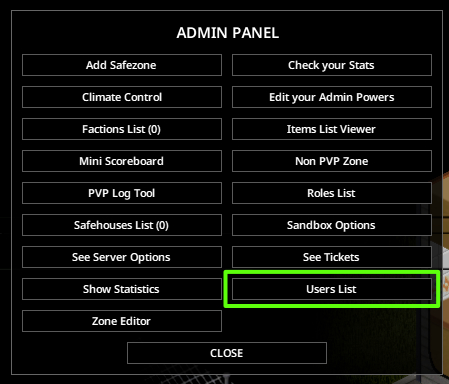
1. Open the admin menu in-game
2. Open the User List
3. Right click on the player of choice and hover over Set Role from here, select the wanted roll from the dropdown.
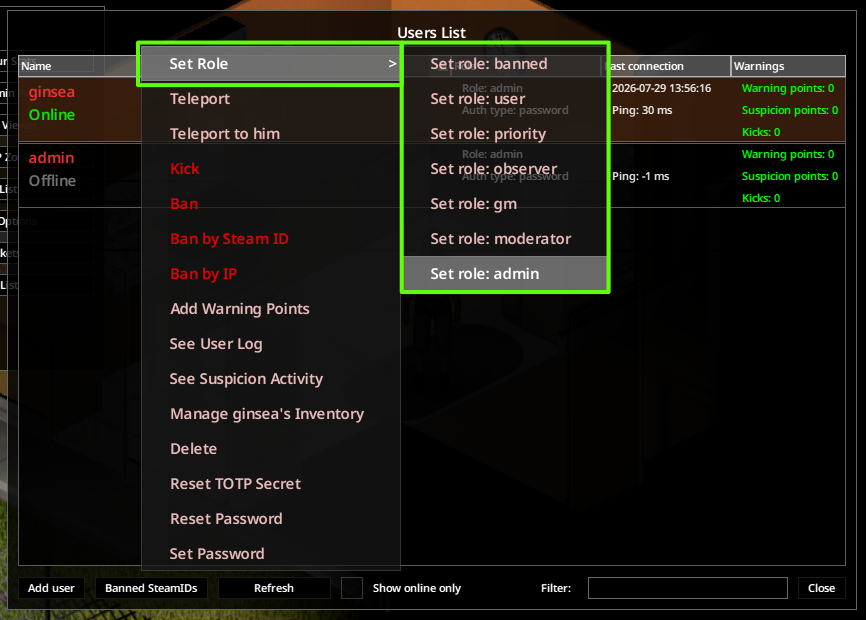
The different types of permissions are noted in the following chart:
| Access Level | God Mode | Invisibilty | Teleport | Ban/Unban | Whitelisting | Modify Player Stats | Join Server when Full |
| Observer | ✔ | ✔ | ✔ | ✔ | |||
| GM | ✔ | ✔ | ✔ | ✔ | |||
| Overseer | ✔ | ✔ | ✔ | ✔ | ✔ | ||
| Moderator | ✔ | ✔ | ✔ | ✔ | ✔ | ✔ | |
| Admin | ✔ | ✔ | ✔ | ✔ | ✔ | ✔ | ✔ |